
Chapter 5 of 16 · all chapters
- 1. What Examiverse does
- 2. Set up your company
- 3. People, roles and skills
- 4. Make a course
- 5. Languages
- 6. How employees learn
- 7. Interactive games
- 8. Live Practice
- 9. Chart Lab
- 10. Certificates and evidence
- 11. Reports and checks
- 12. LMS Studio
- 13. Export any course
- 14. Translate a video
- 15. Plans and credits
- 16. What runs on its own
Training in every language your people read
Lessons, questions and narration are made in each language, not subtitled. Languages come from your roster, or exactly the ones you choose.
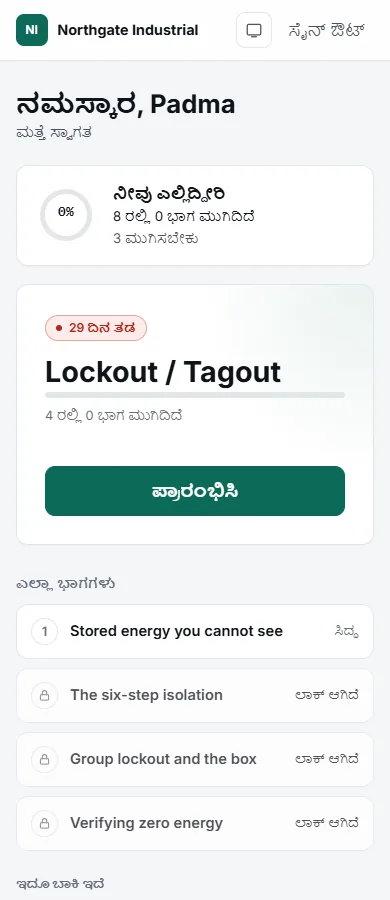
- 1The course due next, and how late it is
- 2Start opens once it is ready
- 3A practice call waiting
- 4The certificates they hold
How languages are decided
- By default a course is made in the languages read by the people whose job needs it — taken from each person’s language on the People screen.
- If you choose the languages yourself, that set is final. It is never widened or narrowed for you.
- You can add a language to a finished course at any time. It reuses the slides and pictures already made, so a second language costs far less than the first.
- Narration is available in 64 languages, including Hindi, Kannada, Tamil, Telugu, Malayalam, Marathi, Bengali, Gujarati, Punjabi, Odia, Assamese, Urdu, Arabic, Filipino, Nepali and Sinhala.
- Arabic and Urdu films are laid out right to left: boards, titles and animations read from the right, and product names, codes and prices in English letters keep their own order inside the line.