
Chapter 10 of 16 · all chapters
- 1. What Examiverse does
- 2. Set up your company
- 3. People, roles and skills
- 4. Make a course
- 5. Languages
- 6. How employees learn
- 7. Interactive games
- 8. Live Practice
- 9. Chart Lab
- 10. Certificates and evidence
- 11. Reports and checks
- 12. LMS Studio
- 13. Export any course
- 14. Translate a video
- 15. Plans and credits
- 16. What runs on its own
Certificates, verification and audit evidence
Every pass is a sealed record with a public verification link. Download the evidence pack an inspector asks for, for today or for a past day, including what is still missing.
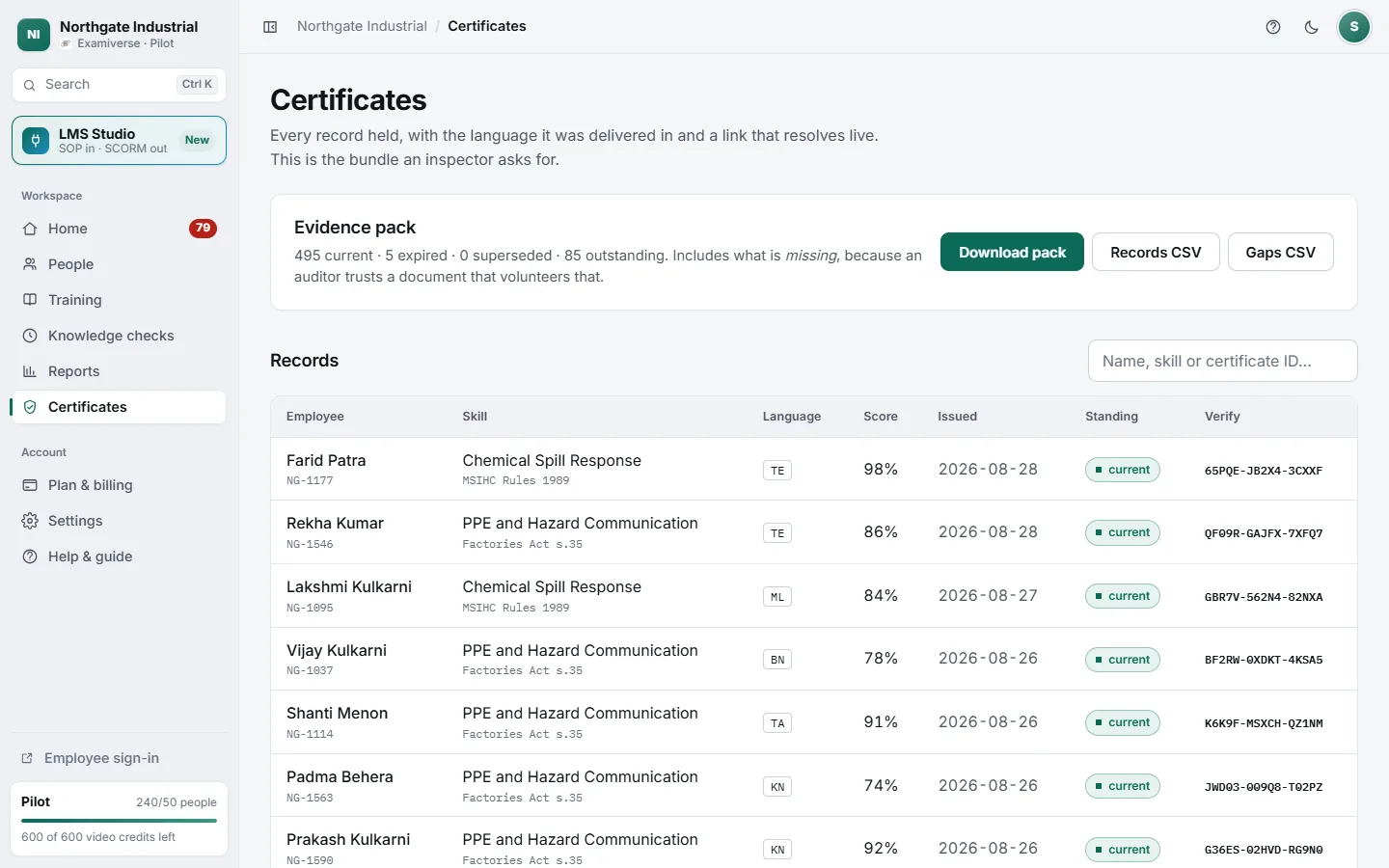
- 1The whole evidence pack in one download
- 2The register as it stood on a past day
- 3Language the person was trained in
- 4Current, expired or superseded
- 5An ID anyone can verify
What a certificate proves
- It is issued only when a person passes every part of the course, not the first module.
- It carries the score, the language it was delivered and assessed in, the course version and the date.
- Anyone can check it at a public verify page — from its ID or by scanning the QR code — without an account. Someone holding only the ID can type it at app.examiverse.com/verify.
- Each course has its own signer and design: the person who can vouch for working at height is not the one who vouches for food handling.
- The employee keeps their own copy. Under What you hold on their home screen they see the certificates that stand now and the earlier ones that expired or were replaced, and from the certificate page they download it as a PDF file or a picture, print it, or copy its verification link. A name written in another script, such as Hindi, Tamil or Arabic, is drawn in a matching typeface.
Expiry and change, handled for you
- Re-certification opens on its own before a certificate lapses, so nobody goes out of date without appearing on your outstanding list first.
- When a lesson of a live course is changed or added, certificates already issued name the course version they were earned on, and you choose who retakes it: everyone at their next renewal, or now, by a date you set. After that date, certificates not renewed show as superseded, never cancelled.
- The evidence pack includes what is missing as well as what is held, because an auditor trusts a document that volunteers its gaps.
Evidence that holds up when it is questioned
- Which version: the pack shows the version each person passed beside the version the course is on today. Certificates lists every current certificate earned before its course last changed, so you can see who has not yet taken the latest.
- A past day: choose a date under "As it stood on a past day" to download the register as it stood at the end of that day, with every record issued by then and what was outstanding then. This answers the question asked after an incident or at an audit.
- Sealed records: every certificate is sealed when it is issued, and each seal is built on the one before it. The pack checks every seal as it is made and prints the newest one. Keep a pack, and you can show later that no record was changed, removed or added in between.
- The pack includes seals.csv, so an auditor can recompute any seal without relying on us.